R2Park PARKING Registration: Guest & Resident Guide (2026)
R2Park makes guest and resident parking convenient – register your vehicle online in minutes, follow property guidelines and avoid towage. Try it now for free.
Anyone who’s lived in an apartment complex or gated community knows how parking can spiral into a headache. One day there are plenty of spots, the next day someone’s guest has taken yours, and nobody seems to know what the actual rules are — at least not until a tow truck shows up or a notice appears out of nowhere on someone’s windshield.

R2Park exists because of exactly that mess. It’s a simple online system: residents register their own cars, guests do the same before they even arrive, and property managers get an actual tool to enforce parking rules — not just a sign that everyone walks past and ignores.
Setting it up doesn’t take long. Head over to register2park.org, fill in a few basic vehicle details, follow whatever rules your property has in place, and that’s it. No calling the office, no digging through the glovebox for a paper permit you probably lost anyway. If your building’s still relying on a clipboard sign-in sheet — or nothing at all — it might be time to switch to something that actually works.
WHAT IS R2PARK?
R2Park is basically an online system for managing parking — for both residents and their guests. No paperwork, no confusion about where you can and can’t park, none of that.
The way it works is pretty straightforward. Property managers set the rules for their building — how many guest spots there are, how long a guest is allowed to park, which spaces belong to residents, that kind of thing. Once those rules are set up, residents and guests just register their car online before they park. The system then tells them exactly where they’re allowed to go and for how long.
Since it’s all done online, there’s nothing to print out, nothing to mail, and no trip to the front office required. Residents don’t have to worry about losing some paper permit in their car, and guests aren’t left guessing whether they’ve parked somewhere they shouldn’t have. And on the property manager’s side, they can actually see who’s parked where, which makes catching rule violations a lot less of a hassle.
Basically, R2Park takes something that used to run on clipboards, handwritten signs, and a lot of guesswork, and turns it into something that just… works, online, without the headache.

WHAT’S THE PROCESS OF REGISTRATION?
Getting registered on R2Park honestly doesn’t take long — just a few minutes. You can do it straight from your browser, or use the R2Park app if you’d rather register on your phone. Either way, there’s no paperwork to fill out and no need to walk over to the property office. Doesn’t matter if you’re a resident adding your own car or registering a spot for someone visiting you — the steps are basically the same either way. Here’s how it goes:
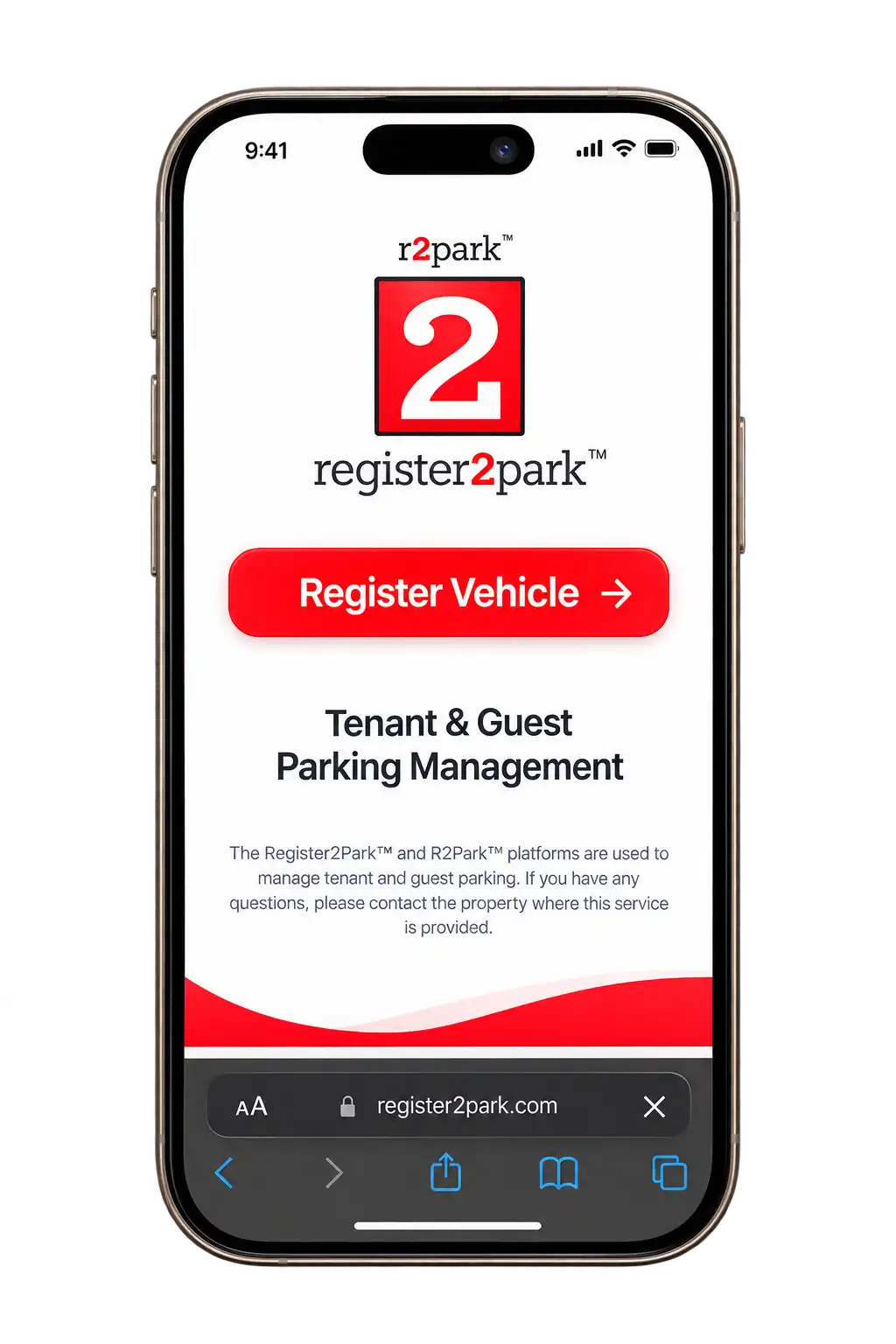
Step 1: Visit the official website of R2Park
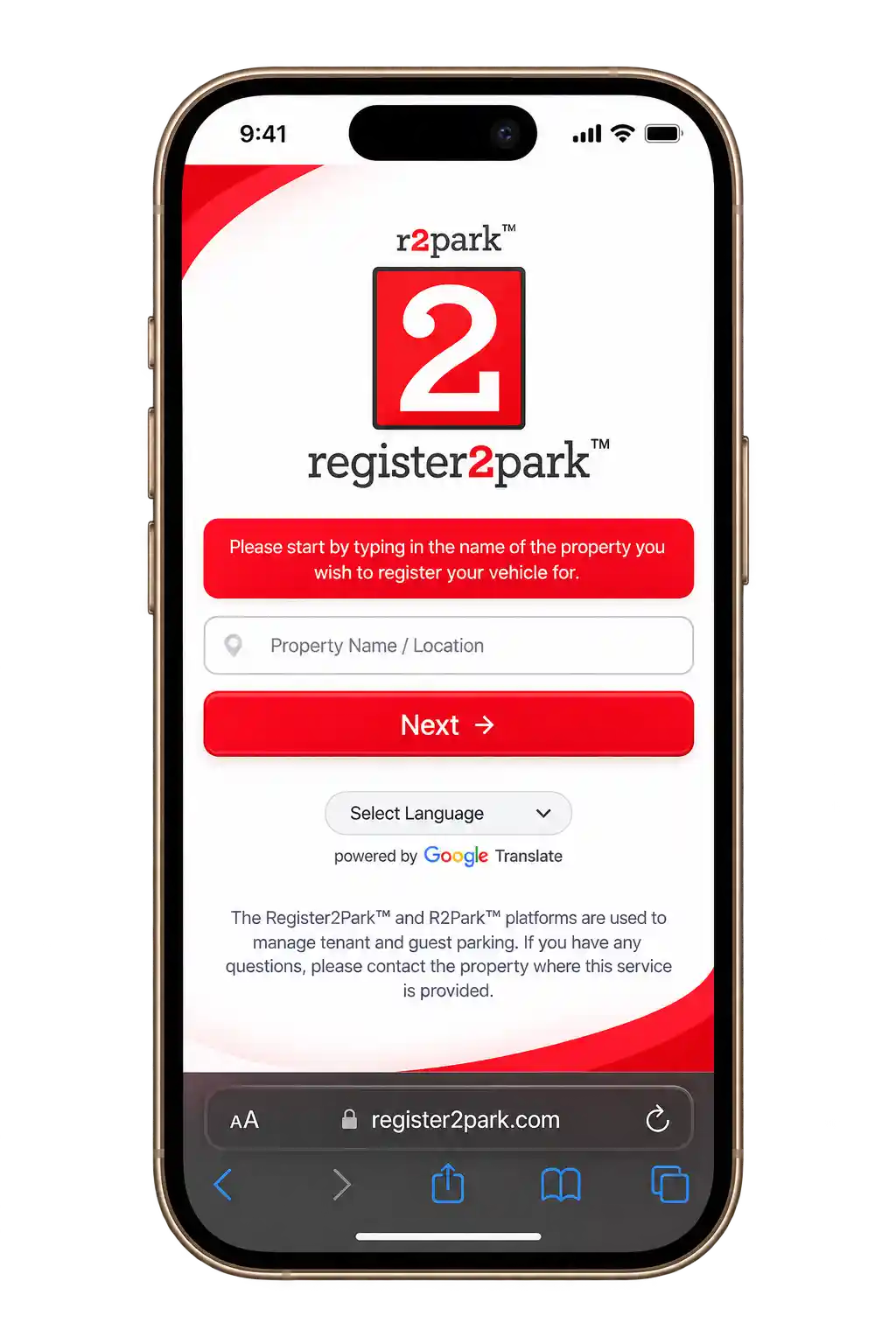
Step 2: Enter your property details
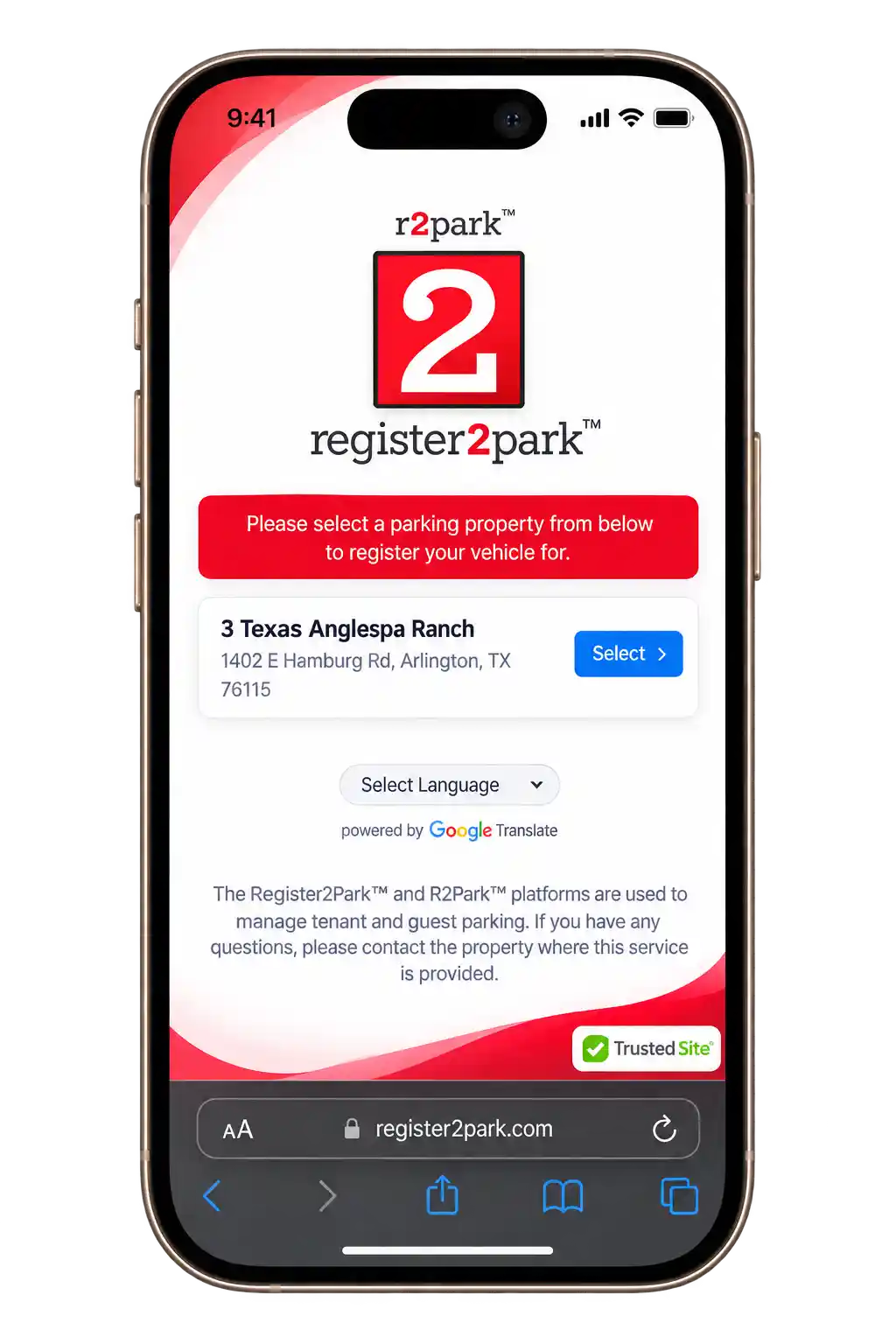
Step 3: Confirm your property
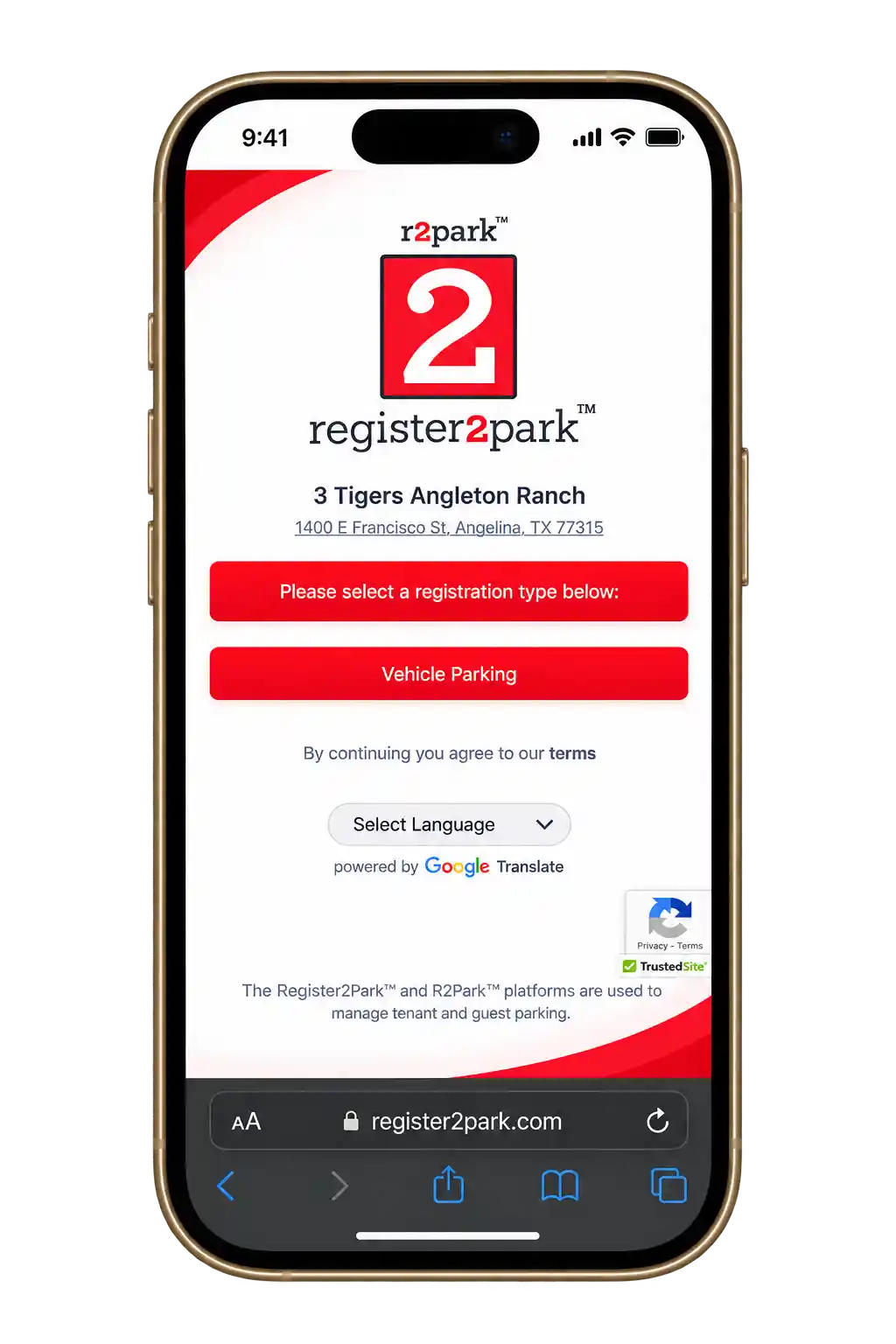
Step 4: Choose resident or guest parking
Step 5: Enter your vehicle details
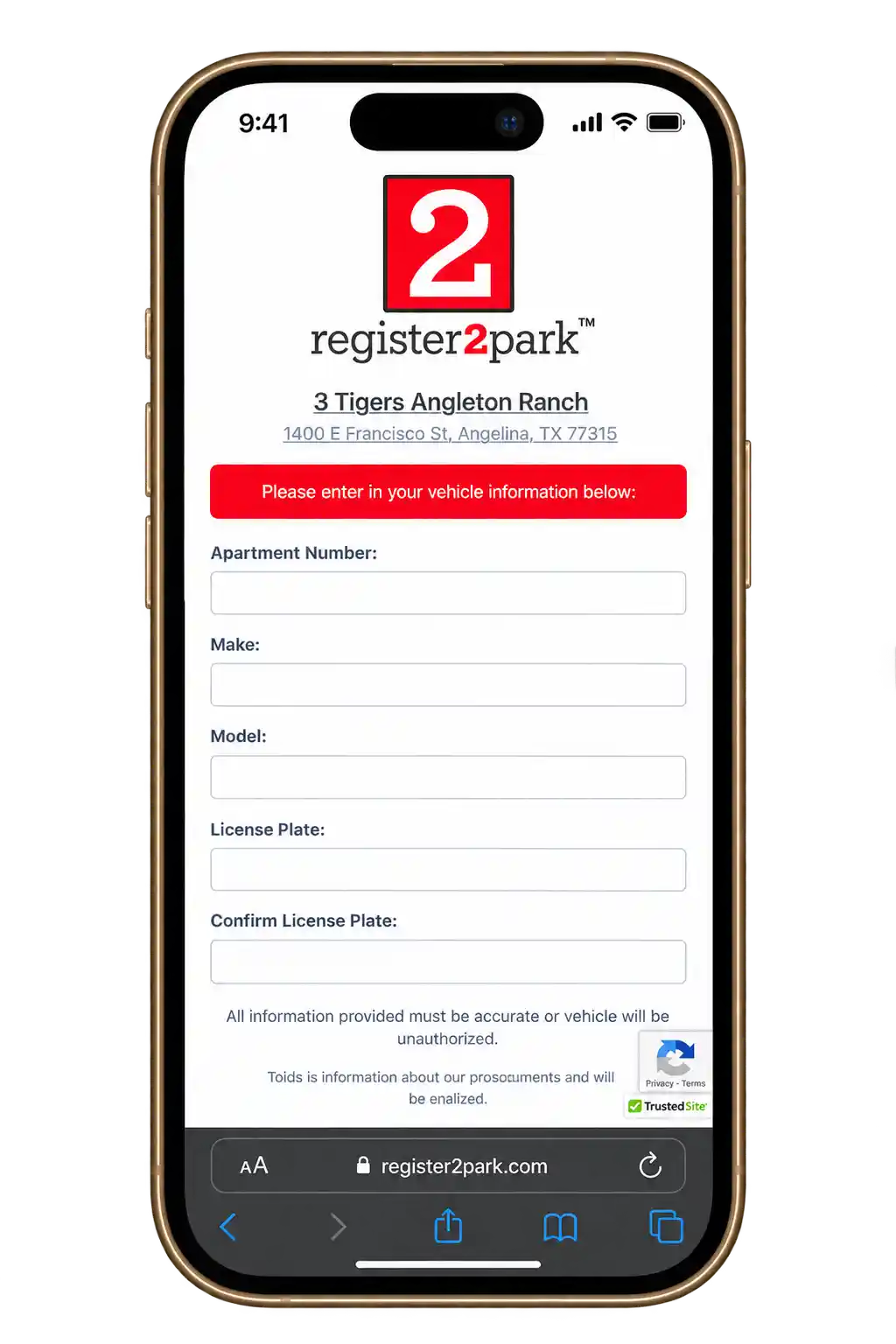
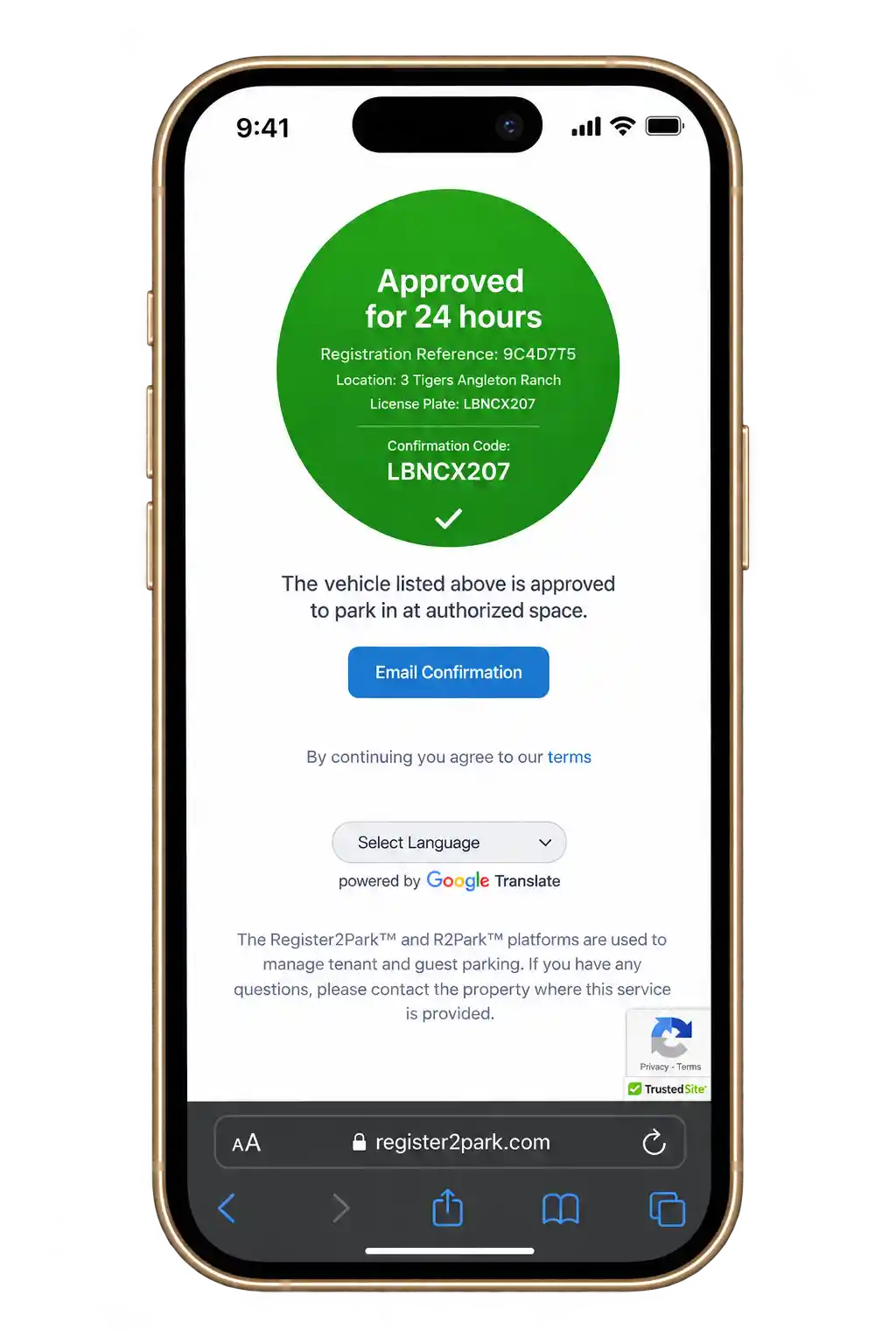
Step 6: Finalize Your Booking:
Prefer not to register online? You can call (888) 883-7458 instead, and someone from the R2Park team will take your details over the phone. You’ll still get the same confirmation email you’d receive from registering on the website — just without having to type anything in yourself.
R2PARK LOGIN – FOR RETURNING USERS
Already registered once? You don’t need to start over. Go to the official R2Park website (register2park.com) and click “Login” near the top of the page. Enter the email address or phone number you signed up with, and R2Park will send a confirmation code to verify it’s really you.
Once you’re in, you can check your permit status, view past registrations, or start a new one in seconds. Forgot your login details? Use the “Forgot Login” link on the sign-in page, or call R2Park support at (888) 883-7458.
Just go to register2park.com and find “Login” near the top of the page. You’ll need whatever email or phone number you used the first time you signed up, and then a confirmation code gets sent over — that part’s just to confirm it’s actually you logging in, not someone else. Once you’re in, it’s all sitting right there: old registrations, permits that are still active, your property info, the works. No digging around trying to find your property again.
And if you’ve forgotten your login somehow? Not a big deal. There’s a “Forgot Login” link right on the site, or you can just call (888) 883-7458 and someone on their end will help you get sorted.
EDITING OR CANCELLING A REGISTRATION
Plans don’t always go as expected. A guest might need extra time, a vehicle might change, or you may just want to cancel a registration you no longer need. Most of this you can handle on your own — no need to call in.
Log into your account and pull up the registration in question. Need to change the dates, update the car, or adjust guest details? Click “Edit.” Don’t need the registration at all anymore? Click “Cancel.” Once you do either, you’ll get an email confirming it went through.
Can’t get it done online, or would rather have someone handle it directly? Call (888) 883-7458 and the support team will take it from there.
R2Park Apps – Mobile Convenience
You don’t need to be sitting at a laptop just to sort out parking. R2Park has an app too, and it does pretty much everything the website does — residents, guests, and property managers can all register a car, add a guest, or check on a permit straight from their phone, wherever they happen to be.
It’s built for the moments the website isn’t great for — like when a guest is already pulling up and you need to register them in thirty seconds, or when you just want to double-check your permit’s still active without opening a laptop. The app’s available for both Android and iOS, so it doesn’t really matter what phone you’re using.
Android App
If you’re on Android, you’ll find the R2Park app on the Google Play Store. It does pretty much everything the website does — registering your vehicle, adding a guest’s car, looking up your property, checking on your permit — except you don’t have to mess with opening a browser every time. Plus you get push notifications, so you’ll actually know if your permit’s about to expire instead of finding out the hard way.
iOS App
Even iPhone users are not left behind because there is an application available on the App Store. Again the same case applies where you can create an account, validate your information, verify that you are following parking guidelines, and check the status of your permit all from the one application.
Why Use R2Park Apps?
If you would prefer to do everything via your mobile device, then R2Park is the one for you as well, because it can be downloaded on both Android and iOS. The registration of the vehicle, the regulations concerning parking, or handling the parking issue for your guests – all that you may do anytime and anywhere.
Say a friend’s coming over and needs a spot for the night. Instead of running to your laptop or calling the office, you just pull up the app and register their vehicle in under a minute. Same goes for checking your own permit status, seeing how much time you’ve got left on a guest pass, or just double-checking you’re not about to get towed for parking somewhere you shouldn’t. It’s all right there on your phone, no computer required.
The app is free to download from the Google Play Store or the Apple App Store, and once it’s set up, it basically works as a pocket-sized version of the full R2Park system — same features, just faster to get to when you’re on the move.
R2PARK RULES – RESIDENT & GUEST PARKING RULES
RESIDENT PARKING RULES
R2Park has some pretty specific rules in place for both residents and guests, and honestly, it’s worth actually reading them instead of skimming. Ignore them and you’re looking at penalties — towing being the big one, or just getting denied parking altogether.
Here’s what residents need to keep in mind:
A couple more worth mentioning: keep your registration current, since an expired one can get flagged the same as no registration at all, and always double check you’re parked in the right zone — resident, guest, or otherwise — because R2Park’s system tracks that pretty closely.
GUEST PARKING RULES
Guest parking comes with its own set of rules, and they’re pretty easy to follow once you know them. Here’s what every guest needs to keep in mind before parking on the property:
Not following these rules can lead to towing, fines, or getting denied access to the property — so it’s worth getting it right the first time.
BENEFITS OF GUEST PARKING

Ensure that guests do not have the ability to park for longer than a certain period of time.

Ensuring guest vehicles are not parked for more than a specified number of days.

Impose a restriction on the number of guests each resident can have.

Set up Your Guest Parking Policy in an Instant.

Your guests are able to get in compliance at any time with regard to your parking policy.

Language translation options are also provided throughout the registration process.
BENEFITS OF VISITOR PARKING SYSTEM
Apartment communities that switch to R2Park’s visitor parking system tend to notice the difference pretty fast. Here’s what it actually brings to the table:
KEY FEATURES OF THE R2PARK PLATFORM
A few things about R2Park worth pointing out
PROPERTY MANAGER SIGN-UP
R2Park isn’t just built for residents and guests — property managers and HOAs can bring their entire community onto the platform too, and honestly, the setup isn’t as complicated as you’d think. Here’s roughly how it goes:
Start by reaching out. Call (888) 883-7458 or send an email to contact@register2park.org to kick off the onboarding process.
Share your property details. Things like how many units you have, how many parking spaces are available, and whatever rules you’re already working under. Doesn’t need to be perfect — the R2Park team will help you refine it.
Work with the team to set things up. Registration rules, guest limits, enforcement settings — whatever actually makes sense for your specific property gets figured out here, not some generic template.
Go live. Once everything’s in place, residents get invited to register their vehicles, and you get access to a dashboard where you can track compliance and handle violations as they pop up — instead of chasing paper trails or relying on someone’s memory of who’s supposed to park where.
If your community is still running on paper permits, a clipboard sign-in sheet, or just whoever happens to remember the rules that day, this is a pretty painless way to actually get a system in place.
DATA PRIVACY & SECURITY
Since R2Park is dealing with personal and vehicle information, security isn’t something they just tack on as an afterthought — it’s built into how the whole system works.
Details like license plate numbers, vehicle info, and contact information are stored securely, and they’re only ever used for two things: verifying registrations and enforcing parking rules. Nothing gets used beyond that.
Access is limited too. Only the property managers actually responsible for a specific community can see that community’s data — no other property, no outside party, nobody else gets a look in. It’s kept separate the way it should be.
If you’ve got questions about how your information is handled — what’s collected, how long it’s kept, who can see it — you don’t have to just take it on faith. Reach out at (888) 883-7458 or contact@register2park.org, and someone will actually walk you through it.
WHY CHOOSE R2PARK?
If you’re comparing parking management options, R2Park is worth a closer look for one simple reason — it actually works for everyone involved. Property managers, residents, guests, nobody has to lose out for someone else to have it easier.

So what makes it different? Here’s the rundown:
Between rules that adapt to the property, registration that takes minutes, and support that’s genuinely there when needed, R2Park is built to make parking simpler — for property managers and residents alike.
WHAT IS R2PARK DENIED PARKING MEANING?
Ever tried registering a car and got hit with a “denied parking” message on R2Park? That basically means the system’s blocking that vehicle from parking there. Something about the registration didn’t line up right — and honestly, there’s almost always a specific reason behind it, not a glitch.
Here’s what usually causes it:
If you get denied and you’re pretty sure you did everything right, don’t just shrug and move on — get in touch with customer service. So say you’re in Texas and this happens to you — call the Register2Park support line at (888) 883-7458, and they’ll help figure out what went wrong.

R2PARK TOWING PARKING
R2Park itself doesn’t tow cars — that’s not something they do directly. What they actually do is connect with towing companies that property managers and parking operators can hook into their system. So if a car gets towed from a property using R2Park, it’s the towing company acting on the property manager’s rules, not R2Park pulling the trigger.
That said, mistakes happen. If your car got towed and you’re pretty sure you didn’t break any parking rules — maybe you were registered properly, or parked exactly where you were supposed to — you can reach out directly. The number to call is (905) 873-7100, ext. 304. That’ll get you through to the towing service handling your property, and you can sort out what happened from there.
It’s worth having your registration details and any confirmation info on hand when you call — that’ll make it a lot easier for them to look into whether the tow was a mistake.

R2PARK CUSTOMER SERVICE
Got a registration issue, a parking problem, or just some random question? R2Park’s support team can sort you out. Give them a ring at (888) 883-7458 — they’re around Monday through Friday, 9 to 5.
Now, towing’s a different story. That doesn’t go through the regular support line at all. If a car’s been towed, or you’ve got a feeling one’s about to be, call (905) 873-7100 and ask for extension 304. That’s the number that actually gets things moving, not the main one.
It’s worth saving both numbers somewhere handy — the general one for registration and account stuff, the towing one for when you need someone fast.

FAQs OF R2PARK

CONCLUSION
R2Park (some people call it R2Parking) cuts down a lot of the back-and-forth that usually comes with managing parking. Doesn’t matter if it’s an apartment building, a gated community, or some bigger property juggling a hundred cars a day — registration takes maybe two minutes, the rules are right there upfront, and managers aren’t stuck guessing who’s parked where. They can just look.
And honestly it helps everyone, not just one side. Managers don’t have to chase people down anymore or put up yet another sign nobody reads. Residents can get a guest parked without calling the office or filling out some form. Guests aren’t left wondering if they’re about to get towed just because nobody told them the rules.
It’s a pretty small fix, but it solves something almost every property deals with sooner or later. Sick of the mystery cars, the towing complaints, the general chaos? Go check out register2park.org. Setting it up takes less time than most people spend arguing about a parking spot in the first place.
